
What this helps you do
Add someone to your church’s People records so they can be contacted and included in Engage Spot activities.
Before you begin
You need to be an Admin or a Limited Admin with permission to create People records. Team Leaders cannot add people.
People records can also be created automatically when someone registers for an Event, subscribes to a Topic, or submits a public Form. Before adding someone manually, search People for their name, email address, or phone number. Updating an existing record prevents duplicate contact information.
You need:
- The person’s first and last name.
- At least one contact method: an email address or phone number.
- Their SMS and email permission choices.
Steps
-
In the admin navigation, select People.
-
Select Add Person.
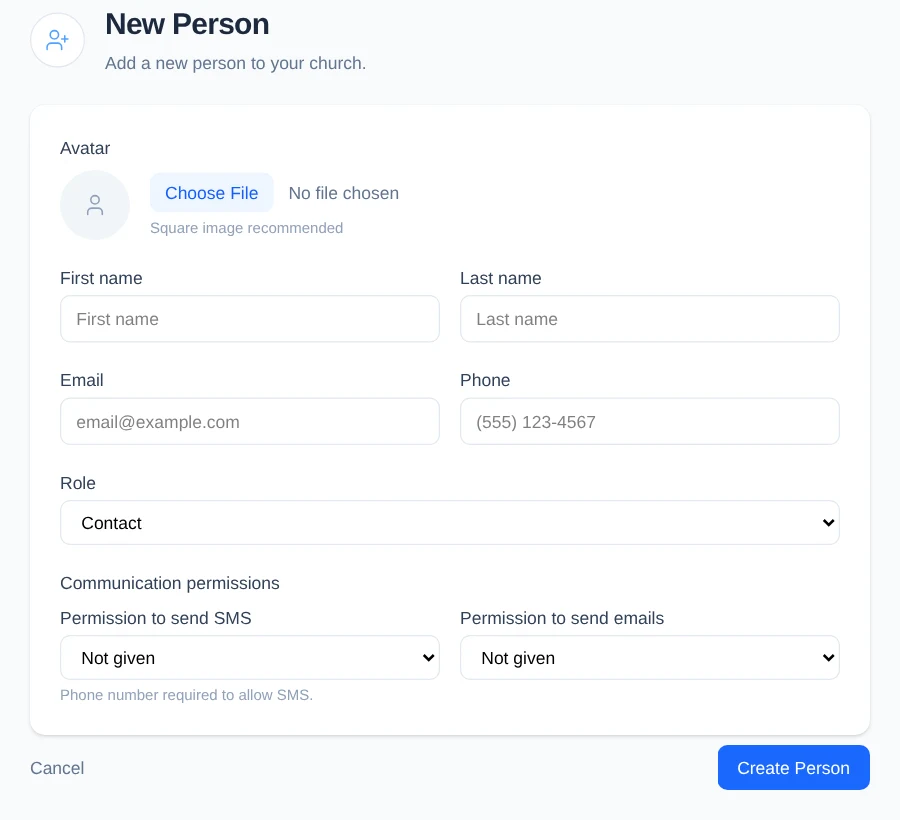
-
To add an optional profile picture, under Avatar, select Choose File and choose a square image.
-
Enter the person’s First name and Last name.
-
Enter at least one contact method:
- In Email, enter their email address.
- In Phone, enter their phone number.
-
In Role, choose the person’s access level. Leave Contact selected for someone who does not need access to the admin area. Team Leader, Limited Admin, and Admin require an email address.
-
Under Communication permissions, choose the status the person has given your church:
- For Permission to send SMS, choose Not given, Given, or Denied. A phone number is required when you choose Given.
- For Permission to send emails, choose Not given, Given, or Denied. An email address is required when you choose Given.
-
Select Create Person.
What happens next
Engage Spot opens the new person’s profile. It shows their role, contact details, communication permissions, and their connections to families, Lists, Events, and Teams.
Adding a person does not send them a message or invitation.
Troubleshooting
Engage Spot asks you to fix errors
Confirm that:
- First name and Last name have values.
- A Contact has an email address, phone number, or both.
- An Admin, Limited Admin, or Team Leader has an email address.
- Given SMS permission has a phone number.
- Given email permission has an email address.
Correct the listed fields and select Create Person again.
The email address or phone number already belongs to someone
Each email address and phone number can belong to only one person in your church. Return to People, search for the email address or phone number, and update the existing record instead of creating another one.
You cannot open the New Person form
Your role does not have permission to create People records. Ask an Admin to add the person or update your Limited Admin permissions.