
What this helps you do
Register for an upcoming church Event while signed in or signed out, then find the registration in My Account.
Before you begin
The Event must be published with registration turned on and still open. Registration is unavailable after the Event ends.
- A public Event appears on the Events page.
- An unlisted Event is available only through a direct link from your church.
- A private Event is not available on the Events page or through a direct public link.
If you are signed out, start with a valid US or Canadian phone number. If you do not have one, you need an email address instead. If you are signed in, Engage Spot uses the person and contact details already connected to your account.
Registering while signed out records communication permission for the phone number and any email address you provide. Registering while signed in does not change an existing Not given or Denied SMS or email permission.
Steps
Register while signed out
-
On your church’s Engage Spot site, select Events.
-
Choose the Event. If your church gave you a direct link to an unlisted Event, open that link instead.
-
Select Register, or scroll to Register for this event.
-
Enter your US or Canadian phone number and select Continue.
-
Complete the result that appears:
- If the number already belongs to your church record, Engage Spot registers you and shows You’re registered!
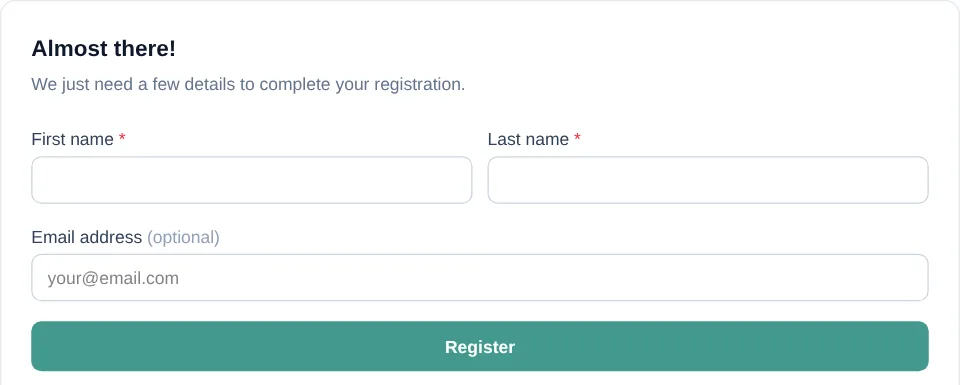
- If the number is not recognized, enter your First name and Last name. You may also enter an Email address, then select Register.
-
If you do not have a valid US or Canadian number, enter any value and select Continue. On the invalid-number message, select I don’t have a US/Canada number. Enter your first name, last name, and email address, then select Register.
Register while signed in
- Open the Event from Events or from a direct link your church provided.
- Under Register for this event, confirm the name shown after You’ll be registered as.
- Select Register Now.
Engage Spot shows You’re registered! with your first name and the Event date and time.

Find your registration
-
Sign in to your church’s Engage Spot site.
-
Open My Account.
-
Find the Event under My Registrations.

What happens next
Returning to the Event while signed in shows Registered and You’re registered for this event instead of another registration button. Registering again with the same person does not create a second registration.
Your church may have configured a separate SMS or email confirmation. A confirmation can be sent only through a contact method for which you have given communication permission.
Troubleshooting
You cannot find the Event
The Event may be unlisted, private, or already ended. Ask your church for the direct link. A direct link opens an unlisted Event, but it cannot open a private Event.
There is no Register button or registration form
Registration may not be turned on, or the Event may have ended. If the page says Registration is closed for this event, the church has closed registration. Contact your church if you still need help registering.
Engage Spot says your phone number is invalid
Enter a valid US or Canadian phone number. If you do not have one, select I don’t have a US/Canada number and provide an email address. An email address is required when you register without a phone number, even though the form currently labels it optional.
You already registered
When signed in, the Event page shows Registered and links to View My Events & Groups. When signed out, entering a known phone number again shows the same successful result without adding a duplicate registration.
You registered but did not receive a confirmation
The Event may not have SMS or email confirmations turned on. A confirmation also requires a contact method with Given communication permission.
If you registered while signed in, existing Not given or Denied permissions remain unchanged. Ask your church to review the SMS and email permissions on your People record.